Mobile App Maintenance & Support
Your app launched. Great. Now it has to keep working on new phones, new OS versions and changing store rules.
Appmart provides mobile app maintenance for live iOS, Android, Flutter and React Native apps across Australia. Our team of app developers in Melbourne keeps existing apps building, passing store reviews and running on current devices. Every engagement starts with a free app health check from our experts. You see your app's real condition before you spend a cent.




































What Is Mobile App Maintenance?
Mobile app maintenance is the ongoing work of monitoring, updating and optimising a live app so it stays secure, compatible and fast. At Appmart, our app maintenance experts own that work so you don't have to.
Your app sits on top of systems you don't control. Apple and Google release new operating systems every year. Payment gateways, map providers and login services retire old API versions. Store rules? They keep moving too.
Any one of those shifts can hurt. An unmaintained app might crash, fail store review or stop taking payments. For most businesses the first hit lands on revenue. Returning customers can't log in. Checkout stops working. Sales stop with it. We plan for exactly this.
Picture this. An iOS app runs without a single complaint for two years. Then Apple raises the minimum SDK for new submissions. The business needs an urgent fix, yet nobody can ship it until someone upgrades the whole toolchain. Nobody wants to learn that on a deadline. Our dedicated app developers make sure you don't.

What Does Our Mobile App Maintenance Service Include?
Appmart's mobile app maintenance services cover nine areas. We include only the ones your app actually uses. You never pay for work it doesn't need.

OS and SDK updates
Permissions, background behaviour, layouts. A new iOS or Android version can change any of them overnight. Our developers test on the betas, so we ship compatibility updates before public release day.

Bug fixing
Some bugs show up on one device and one OS version, and nowhere else. They can eat hours when nobody can reproduce them. So our app developers start there, with a reliable reproduction. Then we find the root cause, fix it and add a regression test.

Security updates
Outdated libraries give attackers an easy way in, and a breach can trigger legal reporting duties. Our team applies security updates as soon as an advisory appears. If that means an extra release, so be it.

Dependency updates
Third party packages, plugins and native libraries age quietly. Then one day, one of them blocks a build. We keep versions moving in small, regular steps, which usually costs less than a single forced upgrade after years of neglect.

Crash and error monitoring
Most users never report a crash. They simply stop opening the app. Tools such as Firebase Crashlytics or Sentry flag the problem first, and our app support experts set them up if you don't have them.

Performance
A slow checkout screen costs far more than a slow settings page. Our developers measure launch time, screen load speed, memory and battery use on real devices, and we fix the busiest screens first. Users delete slow apps without a second thought. This work pays off fast.

APIs and integrations
Payment gateways, maps, login providers, analytics and your own backend all change on their own schedule. Our experts move each integration to the new API version before the provider's deadline. Your customers never see the errors.

Certificates and signing
An expired push certificate fails silently in production. Apple sends renewal notices to the developer account email, but if nobody watches that inbox, customers notice the missing alerts first. Our app support experts track every expiry date for you.

Store compliance
Apple and Google reject updates that miss privacy declarations, target API levels or account deletion rules. We keep all three current and check them before every submission. Your listing stays protected. Releases keep moving through review.
iOS and Android App Maintenance
iOS and Android maintenance share one goal, but the two platforms break in different ways. Our team gives each its own plan. New feature work sits with our iPhone app development services and Android app development services.
iOS app maintenance
Apple releases a major iOS version each September. From April, it usually raises the minimum Xcode and SDK for submissions. An app built on an old toolchain can't ship updates until someone upgrades it. Take 28 April 2026: uploads needed Xcode 26, as listed on Apple's upcoming App Store requirements page. Our iOS developers watch these dates so your app stays ahead of them.
iOS maintenance work includes:
- Xcode, iOS SDK and Swift language upgrades
- Privacy manifests and required-reason API declarations
- Testing across current iPhone and iPad screen sizes
- Renewal of certificates, profiles and push credentials
Android app maintenance
Google Play wants apps to target a recent Android API level, usually by 31 August each year. In 2026, updates must target Android 16 (API level 36), per the Google Play target API level requirements. Fall behind, and your app can become unavailable to new users on newer Android devices. Our Android developers plan each upgrade well before the deadline.
Android maintenance work includes:
- Target API level and Android Gradle Plugin upgrades
- Kotlin, Jetpack and Google Play services updates
- Testing across Samsung, Pixel and budget devices
- Data safety form updates and Play App Signing checks
Flutter and React Native App Maintenance
Cross platform apps share one codebase. They still sit on native iOS and Android layers, though, which means two layers of updates. A framework upgrade can break a plugin. A plugin update can break a native build. Our cross platform experts handle both layers. New cross platform builds fall under our Flutter app development services and React Native app development services.
Flutter app maintenance
Flutter ships several stable releases each year, and each one can change Dart, Gradle or iOS build requirements. So our Flutter developers upgrade in planned steps. One date to note: CocoaPods trunk becomes read only on 2 December 2026. Existing builds keep working. New library versions, though, will stop arriving through CocoaPods.
Flutter maintenance work includes:
- Flutter SDK and Dart version upgrades
- pub.dev package updates and abandoned plugin replacement
- Gradle, CocoaPods and Swift Package Manager fixes
- Regression testing on both platforms after each upgrade
React Native app maintenance
React Native now runs on the New Architecture, so older native modules may need updates or replacement. Skip several versions and the upgrade gets bigger and riskier. Our React Native developers take versions one at a time. Each change stays small enough to test properly.
React Native maintenance work includes:
- Staged React Native version upgrades
- New Architecture migration for older apps
- Expo SDK upgrades for Expo based projects
- Native module updates and library replacement
Is Your App Falling Behind Its Platform?
Tell us which platform and framework your app runs on. Our developers will check how far behind current versions it sits.
Can Appmart Maintain an App Built by Another Developer?
Yes. We take over apps built by freelancers, in house teams and other agencies. Our app takeover experts start with access and a technical review. Why? Because changing code you don't yet understand is the fastest way to create new bugs.
A common situation: the freelancer who built the app has moved on. Nobody can find the Android signing key. The Apple account sits under their personal email.
To maintain an existing mobile app, our developers need access to:
- The source code repository, including full commit history
- Apple Developer and App Store Connect accounts
- Google Play Console and app signing details
- Backend servers, databases and hosting accounts
- Third-party services such as Firebase, payment gateways and analytics
- Existing documentation, designs and known issue lists
Missing access is common, and our team can fix most gaps. If the original developer holds your store accounts, Apple and Google both support transferring the app to accounts you own. Nobody has the Android upload key? Google can reset it for apps enrolled in Play App Signing, and we guide you through it.
We raise missing or incomplete source code before any quote. And one rule applies to whoever maintains your app: your business should own the code and the store accounts. Our existing mobile app takeover guide covers the handover in detail.
Inherited an App From Another Developer?
Send us the access you have today. We'll confirm what's missing before we quote any work.
Mobile App Bug Fixing and Troubleshooting
Mobile app bug fixing starts with reproducing the problem on the same OS, device and app version. Our app developers don't guess, because guessing wastes hours. Crash logs, network calls and backend responses then show where the fault sits. The table below maps common problems to their business impact and the first place we look.
| Problem | Business impact | Where we look first |
|---|---|---|
| App crashes after an OS update | Users lose access until a fix ships | Deprecated APIs, outdated SDKs and crash reports |
| Login or sign-up fails | Returning customers cannot sign in | Auth tokens, social login SDKs and backend sessions |
| Payments fail at checkout | Lost sales and extra support calls | Payment SDK versions, gateway API changes and error logs |
| Push notifications stop arriving | Missed alerts and lower engagement | APNs and FCM credentials, plus permission changes |
| Key screens load slowly | Users abandon important journeys | API response times, image sizes and rendering code |
| A store rejects an update | Planned releases stall | Rejection notes, privacy declarations and target API level |
| The app fails on some devices only | Support load from a group of users | OS versions, screen sizes and device permissions |
Our app support experts triage urgent production issues first. We also give you an estimate before any major work begins. Our mobile app bug fixing page covers common fixes in more detail.
Is Your App Failing Users Right Now?
Describe the problem, the device and the OS version. Our app support experts triage urgent issues first.
How Does Appmart Prioritise Maintenance Work?
We rank maintenance work by business risk. Should a cosmetic bug reported on Monday delay a payment failure reported on Tuesday? Of course not. Our team gives every issue one of three priority levels before work begins, and you approve the ranking.
Priority 1: Critical
- What it covers
- Security exposure, payment or login failures, crash spikes and store removal warnings
- When we act
- Immediately, ahead of planned work
Priority 2: Scheduled
- What it covers
- Store and OS deadlines, dependency advisories and slow key journeys
- When we act
- Within the current maintenance cycle
Priority 3: Planned
- What it covers
- Minor UI bugs, code clean-up and small usability fixes
- When we act
- Grouped into later releases
Your budget goes to the problems that cost you revenue or customers. Our developers still handle cosmetic fixes. They just wait until the broken checkout is sorted.
What Does a Free App Health Check Include?
An Appmart app health check is a free technical review in which our experts document your app's current condition and risks. It becomes the baseline for any maintenance plan. Without a baseline, nobody can measure what maintenance has improved. Our team also surfaces problems a previous developer may never have reported.
What our experts check:
- App, OS target and framework versions
- Age and security status of every dependency
- App Store and Google Play account and listing status
- Certificate, profile and signing key expiry dates
- Crash rates and error trends, where monitoring exists
- Payments, login, push notifications and other critical integrations
- Technical debt and known risks in the codebase
What you receive:
- A written baseline report in plain business language
- A ranked list of risks using the three priority levels
- A recommended maintenance scope with a fixed-price quote
What Triggers Mobile App Maintenance Work?
Most maintenance work is predictable. It follows external changes on a known schedule. Our team builds a maintenance calendar for each app around these triggers, so you see upcoming work months ahead, not after a release breaks.
-
Betas from June, release each September
New iOS version
What we doTest on betas and fix issues before public release
-
Usually enforced from April
Apple Xcode and SDK minimums
What we doUpgrade the toolchain before the deadline
-
Usually 31 August each year
Google Play target API level
What we doUpdate the target API and retest
-
Yearly, from the issue date
Certificates and provisioning profiles
What we doRenew before expiry and update builds
-
Several times a year
Flutter and React Native releases
What we doPlan staged upgrades, not emergency jumps
-
2 December 2026
CocoaPods trunk goes read-only
What we doPlan the move of iOS dependencies to Swift Package Manager
-
Any time
Dependency security advisories
What we doAssess the risk and patch affected packages
-
Per provider notice
Third-party API retirements
What we doMigrate before the old version shuts down
-
Announced with lead time
Store policy changes
What we doUpdate declarations, features or listings
Planning around the calendar: say a retailer wants an end of financial year sale update live in June. The April Xcode change has to land first. Our calendar flags that work in February, well before sale week.
How Much Does Mobile App Maintenance Cost?
We price mobile app maintenance as a fixed price plan, quoted after the free health check. Five factors drive the number. That's why two apps with similar screens can cost very different amounts to maintain.
The five factors that drive app maintenance cost:
- Complexity: screens, user roles and custom features
- Integrations: payments, login, maps, CRM and other services
- Platforms: one native app, two native apps or one cross-platform codebase
- Code condition: dependency age, technical debt and test coverage
- Release needs: how often you ship and how fast issues need attention
Two native apps usually cost more for our team to maintain than one Flutter or React Native codebase. Neglect costs more too. Leave an app untouched for years and the required upgrades stack up. Our mobile app maintenance cost guide covers budgeting in more detail.
What does a maintenance plan cover, and what costs extra?
Clear scope prevents surprise invoices. Every plan keeps maintenance and project work separate.
Included in maintenance
- OS, SDK and dependency updates
- Bug fixes in existing features
- Security updates
- Certificate and store compliance work
- Monitoring and release management
Quoted as separate project work
- New features and new screens
- Major redesigns
- Rebuilding the app on a new framework
- New third-party integrations
- Large backend or infrastructure changes
Want a Fixed Price for Your App's Maintenance?
Start with a free app health check. You get a fixed-price quote, with no obligation to proceed.
How Does Appmart's Mobile App Maintenance Process Work?
Every maintenance engagement follows the same seven steps. The first four happen once. The last three repeat every maintenance cycle.
1. Access
Your team shares code, store accounts, servers and third party logins with our developers. You keep ownership of every account from day one.
2. Technical baseline
Our experts run the free health check and record versions, dependencies, credentials and known risks. Every later report measures against that baseline.
3. Risk priorities
We give every open issue a Priority 1, 2 or 3 rating based on business impact. Nothing starts until you approve the ranking.
4. Stabilisation
Crashes, failed payments and store warnings come first. Once our team clears the Priority 1 list, the app is safe to release again.
5. Release
We test each build on real devices before we submit it to both stores. Phased rollouts then limit the impact of anything testing missed.
6. Monitoring
Our app support experts watch crash rates, error logs and store reviews to see how each release performs in the field. If a regression appears, we fix it before it reaches more users.
7. Recurring maintenance
Our maintenance calendar sets the work for each cycle, from SDK deadlines to certificate renewals. Our progress reports explain it all in plain business terms.
Mobile App Maintenance vs Support: What Is the Difference?
Mobile app maintenance is planned work that keeps an app current, secure and stable. Mobile app support is the response side: incidents, user reports and urgent fixes. Appmart's maintenance and support plans combine both, so our developers and app support experts work as one team. Planned work also cuts how often you need urgent support.
| Planned maintenance | Reactive support | |
|---|---|---|
| Trigger | Calendar, deadlines and monitoring data | Incidents, outages and user reports |
| Goal | Prevent problems before users see them | Restore normal service quickly |
| Examples | OS upgrades, dependency updates and certificate renewals | Crash fixes, failed logins and broken integrations |
| Cost pattern | Predictable and budgeted | Variable, often at short notice |
| Business effect | Fewer emergencies and steadier releases | Shorter downtime when issues occur |
Apps without planned maintenance rely entirely on reactive support. Our mobile app support services still cover urgent issues. But our calendar makes those issues far less frequent.
What Makes Appmart's Maintenance Approach Different?
Many maintenance retainers sell a block of developer hours and work through tickets in arrival order. We work differently at six points, shown below.
| Typical hours-based retainer | Appmart maintenance plan | |
|---|---|---|
| Starting point | Work begins on the first ticket | Work begins with a documented baseline |
| Order of work | Tickets in arrival order | Issues ranked by business risk |
| Planning | Reacts when something breaks | Calendar built around known platform deadlines |
| Reporting | Hours used and tickets closed | User impact, failed transactions, release blockers and store risk, where data exists |
| Account ownership | Sometimes held by the developer | Held by your business, with every change documented |
| Pricing | Hourly or block-of-hours billing | Fixed price, quoted after the health check |
Your business holds the accounts and the documentation. That means you can move the app to another team at any time. And you never need to read code to follow a report from our experts.

Australian-Operated
Being an Australia-based app support and maintenance agency, we understand local compliance, business expectations, and operational realities across Australian and global industries.
Future-Ready App Maintenance Models Driven by Performance Monitoring
Our app maintenance services are built on enterprise-grade maintenance models used in high-dependency production environments. We do not apply these as theories. Our app experts actively own and execute each maintenance stream to keep live applications stable, secure, and reliable over time.

Corrective Maintenance
We resolve crashes, defects, and functional issues that affect application stability, usability, and app store performance, restoring reliable operation in production.

Adaptive Maintenance
We manage platform changes by updating applications for new OS versions, device releases, SDK updates, and third-party dependency changes, maintaining compatibility as platforms evolve.

Perfective Maintenance
We optimise performance, responsiveness, and user experience through continuous refinement and targeted enhancements based on real usage scenarios.

Preventive Maintenance
We reduce future risk by addressing technical debt, improving architectural resilience, and strengthening fault tolerance to prevent avoidable failures.
Case Studies
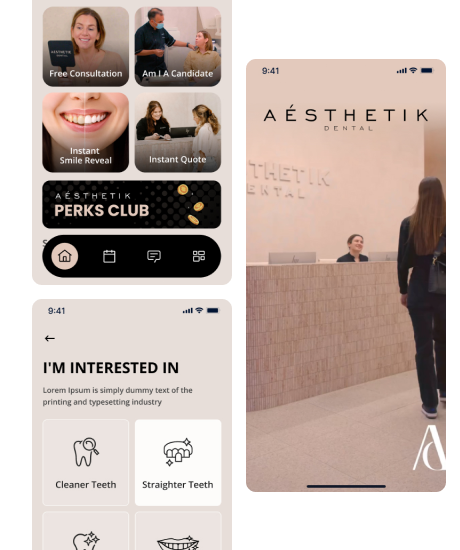
Aesthetik Dental
Aesthetik Dental is one of the most contemporary cosmetic dental brands in Australia, offering a wide range of services from aligners and veneers to whitening and full smile makeovers.
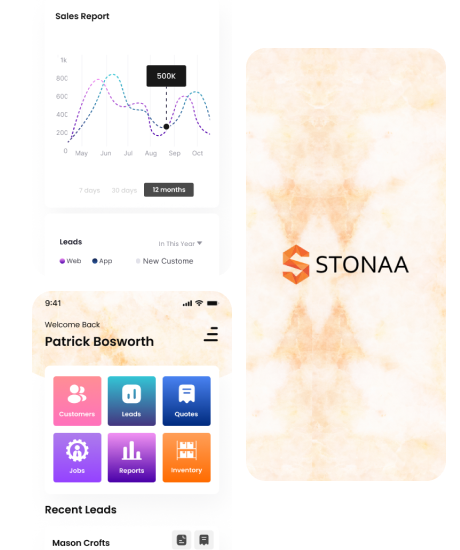
Stonaa
Stonaa is a premium stone supplier in India, specialising in Granites, Marble, Travertine, Sandstone, Bluestone, Artificial Stones, and Stacked Stone (Elevation).
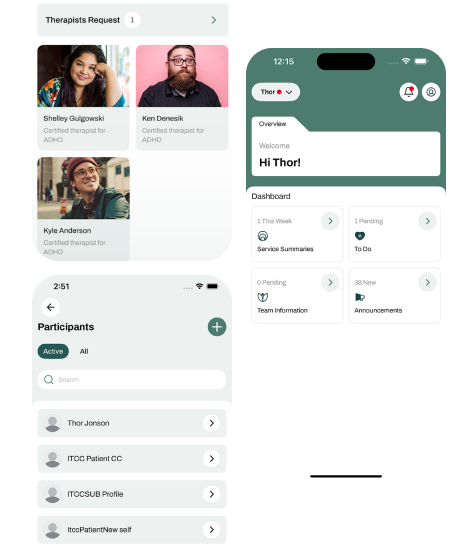
MPGo
MPGo is a purpose-built platform designed to make healthcare program delivery simple, connected and accountable.
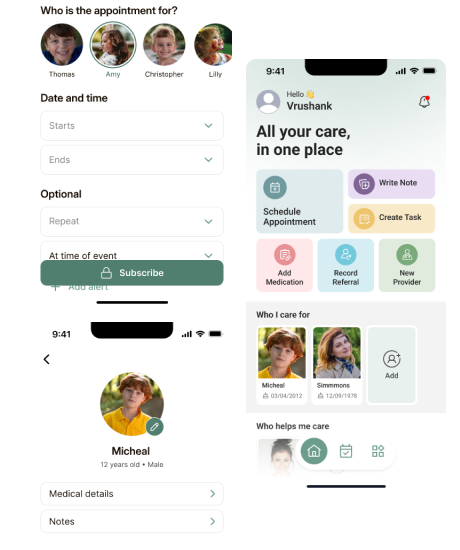
Carer’s Notebook
Carer’s Notebook is a digital care-management platform based in Australia, built to support caregivers by organising essential care data in one secure, accessible place.
Which Industries Does Appmart Maintain Apps For?
Maintenance priorities shift by sector. Here are the industries where our team has delivered projects, and what we protect in each:

Fintech and banking
payment, identity and authentication services that cannot fail quietly

Healthcare
Privacy Act 1988 and Australian Privacy Principles obligations, including the Notifiable Data Breaches scheme

Real estate
listing feeds, CRM connections and property search performance (real estate app development)

Request For Proposal
Frequently Asked Questions
A live mobile app needs continuous monitoring and scheduled updates all year. Release cadence depends on the app. Busy transactional apps may need monthly releases. Simpler apps can run on a quarterly cycle. Our developers also plan extra work around every major iOS and Android release.
An unmaintained app gradually breaks as the systems around it change. Expect crashes on new OS versions, expired certificates, rejected store updates and security exposure. Catching up after a long gap usually costs more than steady maintenance would have. We see that gap close fastest when an app comes to us early.
You do, because the platforms underneath it change every year. Store target API rules, certificate expiry and dependency security issues apply even when you add no new features. Our experts usually recommend a lighter plan for a low change app.
Yes. We need the full source code and commit history to maintain an app safely. Without them, we can only assess the app from the outside. If the code is missing, our team sets out your options in the health check, including a partial or full rebuild.
Only if you ask us to. We keep existing features working on current platforms. One caveat: rebuilding with a new Apple SDK can restyle standard system controls, so our developers flag any visible change before release. Design or feature changes get their own scope, and you approve it first.
Our team maintains native iOS apps, native Android apps and cross platform apps built with Flutter or React Native. That covers customer facing apps and internal business apps. Our developers can also review the backend APIs your app relies on.
Yes. We provide mobile app maintenance in Australia from our South Melbourne office. Most of our work happens through your code repository and store accounts, so location rarely limits the service.
Find Out What Your App Needs Before You Commit
Send us your app's store links and one line on what worries you most. One of our dedicated app developers reviews the app and replies with a written baseline and a fixed price quote. No obligation to proceed.