AI for law firms in Australia now comes with court rules attached. NSW, the Federal Court and the Federal Circuit and Family Court each limit what lawyers can enter into AI tools and what they must check. Praharsh Parikh, Founder and CEO of Appmart, advises most firms to buy AI inside the practice software they already use. A custom build makes sense for client intake, firm-specific workflows or strict data residency.
This guide puts the court AI practice notes on one page and explains the privilege and privacy risks. It compares Archie, LEAP, Clio, Lexis+ AI and Harvey with a custom build. It ends with a blueprint for an AI intake agent and what each option costs in AUD.
Where AI for Law Firms Stands in Australia
Most Australian lawyers already use generative AI, but few firms have built it into how matters actually run. The LexisNexis 2026 Australia AI Sentiment Survey found 69% of 1,039 respondents use or plan to use generative AI for legal work. LEAP's Profitability in Law report, quoted in the same article, found only 16% of Australian firms use legal-specific AI daily or in core workflows, against 49% globally.
Large firms have moved fastest. Clayton Utz and Corrs Chambers Westgarth have rolled out Harvey firmwide, and King & Wood Mallesons, Gilbert + Tobin and Arnold Bloch Leibler also use it. Small and mid-sized firms mostly use the AI that arrives inside Smokeball, LEAP or Clio, plus a general chatbot on the side.
That side chatbot is where the risk sits. Praharsh Parikh calls this the policy gap: staff use AI every day, while the firm has no approved tools, no review step and no record of what went where. Courts and regulators have now written rules for exactly that gap.
The Court AI Rules on One Page
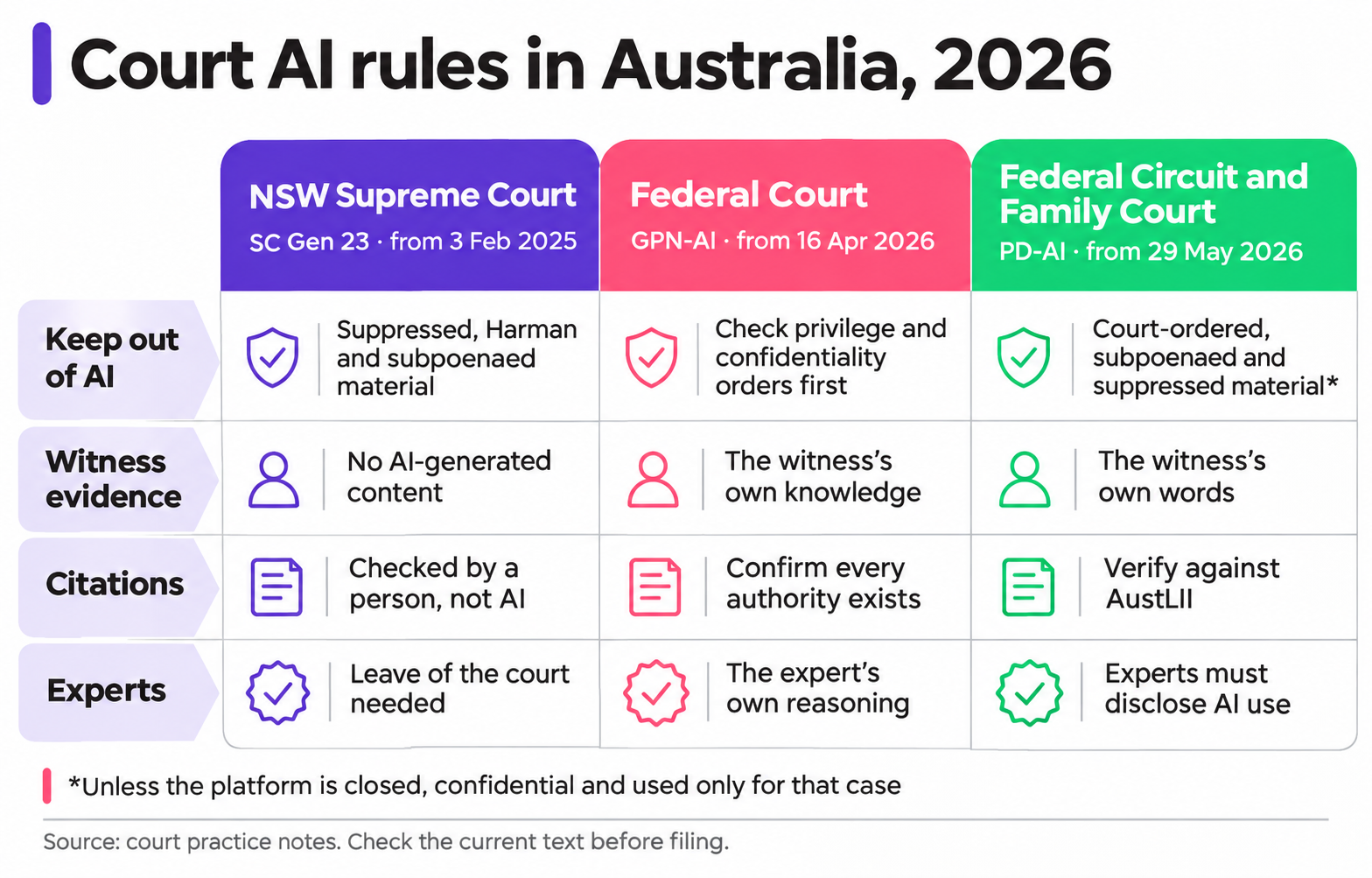
Three court instruments set the baseline for AI use in Australian litigation in 2026. NSW is the strictest: it bans AI-generated content in evidence and needs leave for AI in expert reports. The Federal Court and the Federal Circuit and Family Court allow broader use, but require verification and an explanation of the tool on request.
| Rule | NSW Supreme Court SC Gen 23 | Federal Court GPN-AI | FCFCOA PD-AI |
|---|---|---|---|
| In force | 3 February 2025; the District Court adopts it | 16 April 2026 | 29 May 2026 |
| Must not go into AI | Material under suppression or non-publication orders, the Harman undertaking, subpoenaed documents or statutory publication bans | No outright list; check confidentiality orders, privilege and the implied undertaking before entering anything | Material produced under court orders, subpoenaed material and suppressed material, unless the platform is closed, confidential, not used for training and used only for that case |
| Affidavits and witness evidence | AI must not generate or rephrase the content; the document must say so | Must reflect the witness's own knowledge and experience | Must be in the witness's own words |
| Submissions | Every citation verified by a person, never by an AI tool | Confirm facts, authorities, evidence and chronologies are real and accurate | Fact-check and verify all authorities, for example against AustLII |
| Expert reports | AI drafting only with prior leave of the court | Expert's own opinion and reasoning | Give the expert a copy of PD-AI; experts must disclose AI use |
| Disclosure | Evidence documents must state AI was not used; AI-assisted submissions must state citations were verified | Where AI analysed material a witness relies on, or made multimedia | Generally none, but you must explain the tool and your checks if asked |
| Not counted as generative AI | Spelling and grammar tools, transcription, formatting, chronologies from source documents, search and legal research software | Tools with AI features are covered even if not labelled as AI |
Other courts have followed. The Supreme Court of Victoria issued SC Gen 25 in May 2026 and the County Court of Victoria followed in June. The Administrative Review Tribunal issued a practice direction on 20 August 2026, and the Fair Work Commission's guidance note took effect on 20 October 2026. Check the court's own text before each filing, because each instrument says it will be reviewed as AI changes.
What the court rules mean for the AI tools you choose
The practice notes read as rules for lawyers, but they also work as a specification for any AI for law firms. Praharsh Parikh draws three design rules from them for any legal AI tool, bought or built.
- Protected material stays out by design. The tool needs a way to exclude suppressed material, subpoenaed documents and documents produced under court orders, or to run as a closed platform that meets the FCFCOA test.
- Every answer shows its source. A person has to verify citations, so the tool must link each claim to the document or authority it came from.
- Every use leaves a record. Courts can ask which tool you used and how you checked it, so the tool should log prompts, sources and the reviewer.
What the Legal Regulators Expect Outside Court
Court rules cover filed documents. Day-to-day use of AI for law firms falls under the Statement on the Use of Artificial Intelligence in Australian Legal Practice, issued on 6 December 2024. The Law Society of NSW, the Legal Practice Board of Western Australia and the Victorian Legal Services Board and Commissioner wrote it together. It applies to NSW solicitors and to solicitors and barristers in Victoria and Western Australia.
The statement turns existing conduct rules into six expectations.
- Confidentiality. Lawyers cannot safely enter confidential, sensitive or privileged client information into public AI chatbots. With commercial tools, check the contract terms on security first.
- Independent judgement. AI output is not a substitute for the lawyer's own assessment of the client's needs.
- Verification. Lawyers must personally check AI content, because it can be fluent, convincing and wrong.
- Fair billing. AI use should not raise costs above traditional methods, including the time spent checking its output.
- Supervision. Firms need risk-based policies on approved tools and users, and active supervision of junior and support staff.
- Lower-risk tasks first. The statement recommends limiting AI to tasks that are lower risk and easier to verify.
Queensland practitioners have the Queensland Law Society's Guidance Statement No 37, Artificial Intelligence in Legal Practice, from May 2024.
Privilege, Privacy and Where Your Data Goes
The biggest legal risk in AI for law firms is losing privilege or breaching privacy through the tool itself. Both depend on where client information goes, who can see it and what the provider may do with it. Check these three issues before any tool touches a matter file.
Legal professional privilege
In Australia, advice privilege and litigation privilege both require confidentiality. Clayton Utz notes that conduct inconsistent with confidentiality can waive privilege altogether. No Australian case has yet ruled directly on AI and privilege, but the Law Society of NSW has warned that confidential information placed in a public AI system is close to placing it in the public domain.
The practical line is simple. A closed tool under a confidentiality contract, used by the firm for the matter, is far safer than a public chatbot. Clients using public AI tools on their own disputes create a separate risk, so many firms now ask about it at intake.
The Privacy Act now reaches more small firms
Firms with turnover under $3 million were largely exempt from the Privacy Act. That changed on 1 July 2026 for firms that provide designated services under the AML/CTF Act, such as conveyancing, business sales, company or trust structuring and managing client money. The Queensland Law Society's privacy guide explains that personal information collected for AML/CTF purposes now falls under the Australian Privacy Principles.
This matters for AI intake. An intake tool that collects identity documents for verification is handling exactly that information. From 10 December 2026, APP 1.7 to 1.9 also require covered firms to explain in their privacy policy when software uses personal information to make, or substantially help make, decisions that significantly affect people. An agent that declines enquiries automatically could fall inside that rule.
Data residency
Ask every provider three questions: where data is stored, where the AI model processes it, and which subcontractors can access it. Answers differ more than most firms expect.
- Harvey has offered Australian workspaces since July 2025, with application infrastructure and AI model processing kept in Australian Azure regions.
- LexisNexis says its legal AI is hosted in Australia, while its general AI features use external models processed offshore.
- General chatbots on consumer plans may store prompts overseas and use them to train models unless settings or business terms say otherwise.
For firms covered by the Privacy Act, APP 8 sets the steps before personal information goes overseas. A custom build can run on Australian cloud regions from day one.
Buy First: AI Already Inside Your Practice Software
For most practices, AI for law firms starts with the AI built into the systems they already pay for. These tools already sit next to matter files, precedents and time records, so they need no integration project. The main legal AI tools for lawyers in Australia fall into two groups: practice management AI and research or drafting AI.
| Tool | Where it works | Best suited to | Check before you switch it on |
|---|---|---|---|
| Archie (Smokeball AI) | Inside Smokeball, with the latest version also embedded in Word and Outlook | Small and mid-sized Smokeball firms | Which matters it can read and who reviews its drafts |
| LEAP AI | Built into LEAP practice management | LEAP firms of any size | Which features use which AI model, and where they run |
| Clio Manage AI (formerly Clio Duo) | Inside Clio Manage | Clio firms | Plan inclusions and data handling for your region |
| Lexis+ AI | LexisNexis research and drafting | Research-heavy practices | Which features are the Australian-hosted legal AI and which use offshore general models |
| Harvey | Standalone platform, Australian-hosted workspaces, data-room integrations | Large firms and in-house teams | Cost and rollout effort for a smaller firm |
If your firm runs on Smokeball, LEAP or Clio, use its AI for drafting, matter summaries and correspondence first. If research quality is the bottleneck, trial a research AI built on Australian legal content. Vendors spread their development cost across thousands of firms, which no single small firm can match with a custom build.
When a Custom AI Build Makes Sense for a Law Firm
A custom build makes sense where the work happens outside your practice software, or where your process is specific to your firm. Praharsh Parikh uses one test: if a vendor sells it as a feature, buy it; if it depends on how your firm takes and runs matters, consider building it.
| Task | Buy | Build or configure |
|---|---|---|
| Legal research and case summaries | Yes: research AI on Australian sources | Rarely |
| Drafting letters, emails and documents in Word | Yes: Archie, LEAP AI, Clio Manage AI | Rarely |
| Website, chat and phone enquiries | Partly: general intake tools | Yes, when triage depends on your practice areas |
| Conflict checks across several systems | Partly, inside one platform | Yes, when clients and matters sit in more than one system |
| Identity checks for AML/CTF designated services | Verification providers | Yes, to connect verification to intake and the matter file |
| Document review across your own document store | Harvey and similar, for large firms | Yes, for a mid-sized firm with its own rules and an Australian hosting requirement |
Custom AI for law firms usually earns its place in three situations.
- Intake drives revenue. Personal injury, family, employment and conveyancing firms win or lose matters in the first call. A missed after-hours enquiry can mean a lost client.
- Your systems do not talk to each other. The client list sits in one system, documents in another and identity checks in a third.
- Your clients set data rules. Government, health and corporate clients may require Australian hosting, audit trails and their own retention periods.
Blueprint: An AI Intake Agent for a Law Firm
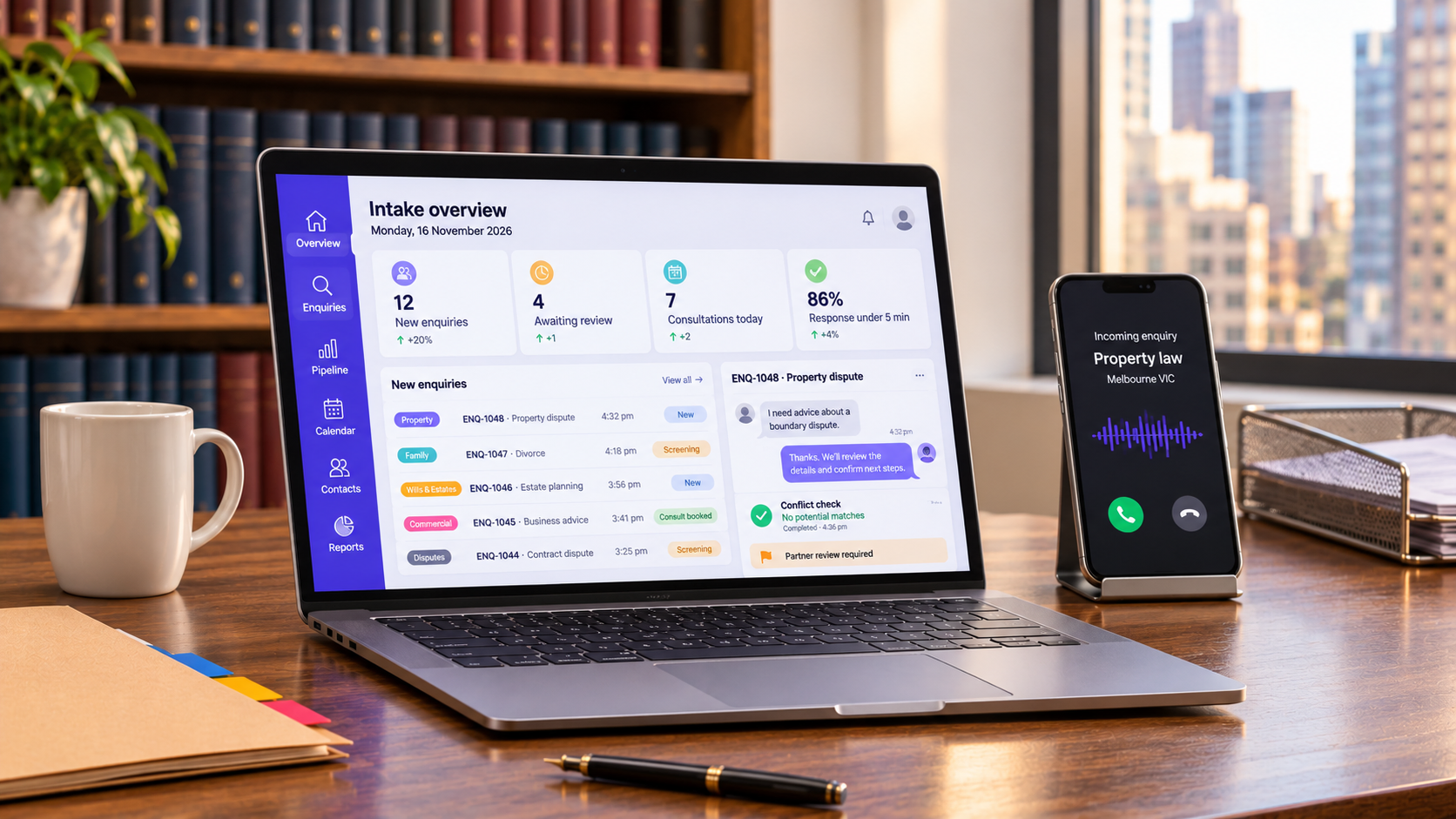
The most useful custom AI for law firms is an intake agent. It answers new enquiries, asks your screening questions and prepares the matter for a lawyer. It does not give legal advice or accept instructions on its own. Praharsh Parikh designs it in six steps, with a person approving every decision that affects the client.
- Capture the enquiry.The agent answers web chat, forms or phone calls and says it is AI. It collects contact details and a short description of the problem.
- Triage by practice area.The agent asks the questions your lawyers set for each practice area, such as key dates. Enquiries outside your practice areas get a referral message your firm wrote.
- Run a conflict check.The agent searches client and matter records across your systems for every party named. Possible matches go to a person, and the agent never clears a conflict itself.
- Verify identity where required.For AML/CTF designated services, the agent passes the client to an identity verification provider. It stores the result against the new matter in Australian storage.
- Prepare the engagement draft.The agent drafts a matter summary, a fee estimate from your fee rules and a costs disclosure draft. A lawyer reviews and approves each one before it reaches the client.
- Book and record.The agent books the first meeting in the right lawyer's calendar. It logs every question, answer and reviewer to the matter file.
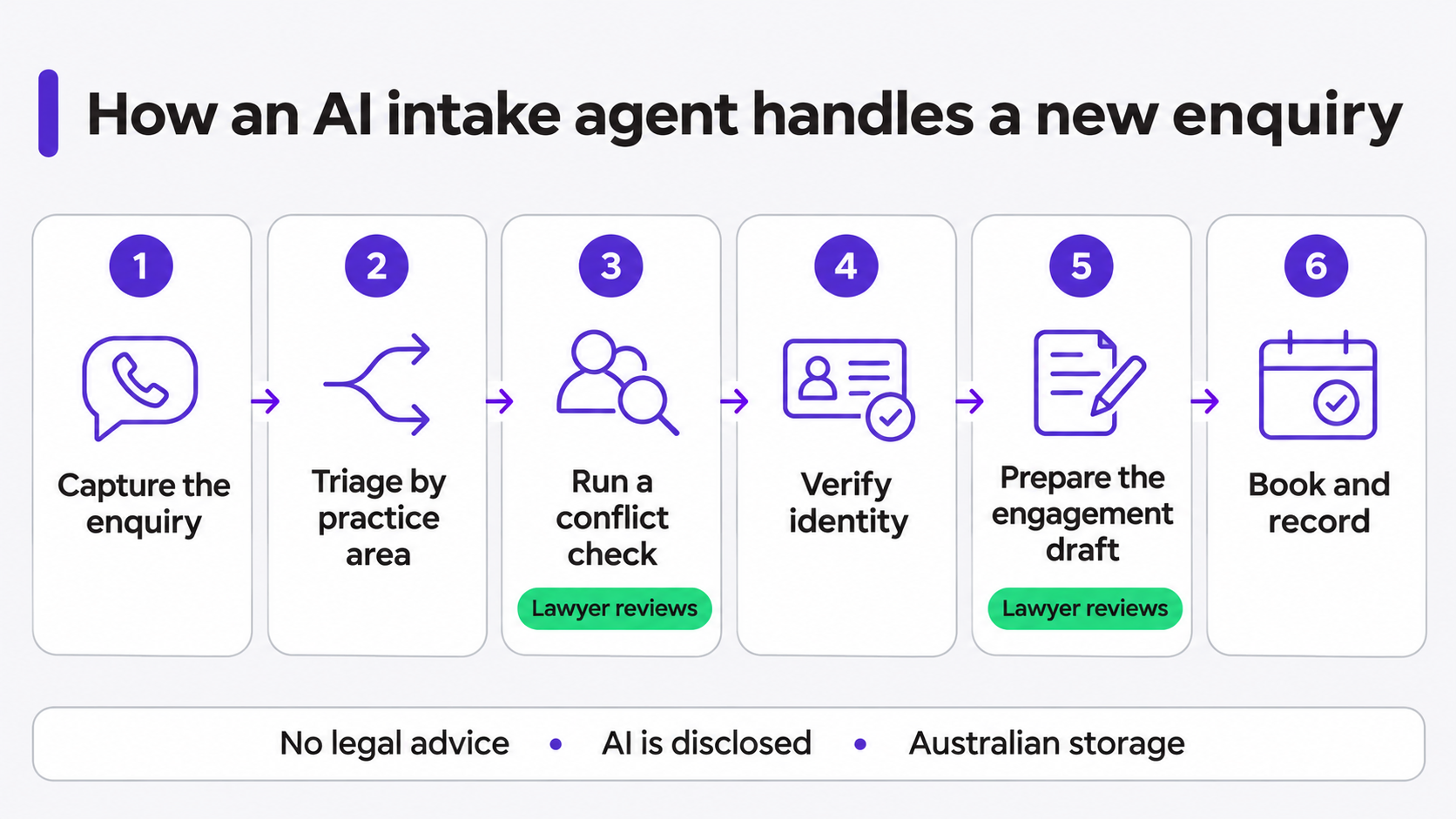
The guardrails matter as much as the features. The agent gives general information only, hands distressed or urgent callers to staff, and never declines an enquiry without a person's approval. For phone intake, the voice layer costs are the same as in our AI receptionist cost guide.
A Document-Review Assistant on Your Own Systems
Document review is the second common use of custom AI for law firms. A document-review assistant answers questions across your firm's own documents and shows the source for every answer. Large firms usually buy one, such as Harvey. Mid-sized firms sometimes build one on their existing document store when they need Australian hosting and firm-specific rules.
The court rules shape the design:
- Exclusions. Suppressed material, subpoenaed documents and documents produced under court orders are blocked unless the assistant runs as a closed platform used only for that proceeding.
- Citations. Every answer links to the document and page, so a lawyer can check it without using AI.
- No training. Firm documents never train a shared model.
- Records. The assistant logs the user, the question and the sources used.
Appmart's custom AI and machine learning work can follow the same pattern: the firm's data stays in its own Australian cloud account, and the AI reads only what each user is allowed to see.
What AI for Law Firms Costs in AUD
The cheapest AI for law firms is the AI inside your practice software, which usually costs a plan upgrade or per-user add-on. A custom AI intake agent costs about $33,000 to $55,000 to build on Appmart's estimate, plus monthly running costs. All figures exclude GST.
| Option | Upfront cost | Ongoing cost |
|---|---|---|
| AI in Smokeball, LEAP or Clio | Usually none | Plan upgrade or add-on, quoted by the vendor |
| Research AI subscription | Usually none | Per-user subscription, quoted by the vendor |
| Custom AI intake agent, one practice management integration | $33,000 to $55,000 (estimate) | Hosting and AI usage, plus maintenance |
| Custom document-review assistant | $45,000 to $90,000 (estimate) | Hosting and AI usage, plus maintenance |
The intake agent estimate uses the blended $175 an hour rate from Appmart's app development cost guide.
- Scoping and intake question design30 to 40 hours$5,250 to $7,000
- Agent build: triage, guardrails and handover rules60 to 90 hours$10,500 to $15,750
- Practice management integration and conflict search40 to 80 hours$7,000 to $14,000
- Identity verification connection20 to 40 hours$3,500 to $7,000
- Review queue, logs and admin controls20 to 30 hours$3,500 to $5,250
- Testing with real enquiry scenarios20 to 30 hours$3,500 to $5,250
Total: 190 to 310 hours$33,250 to $54,250
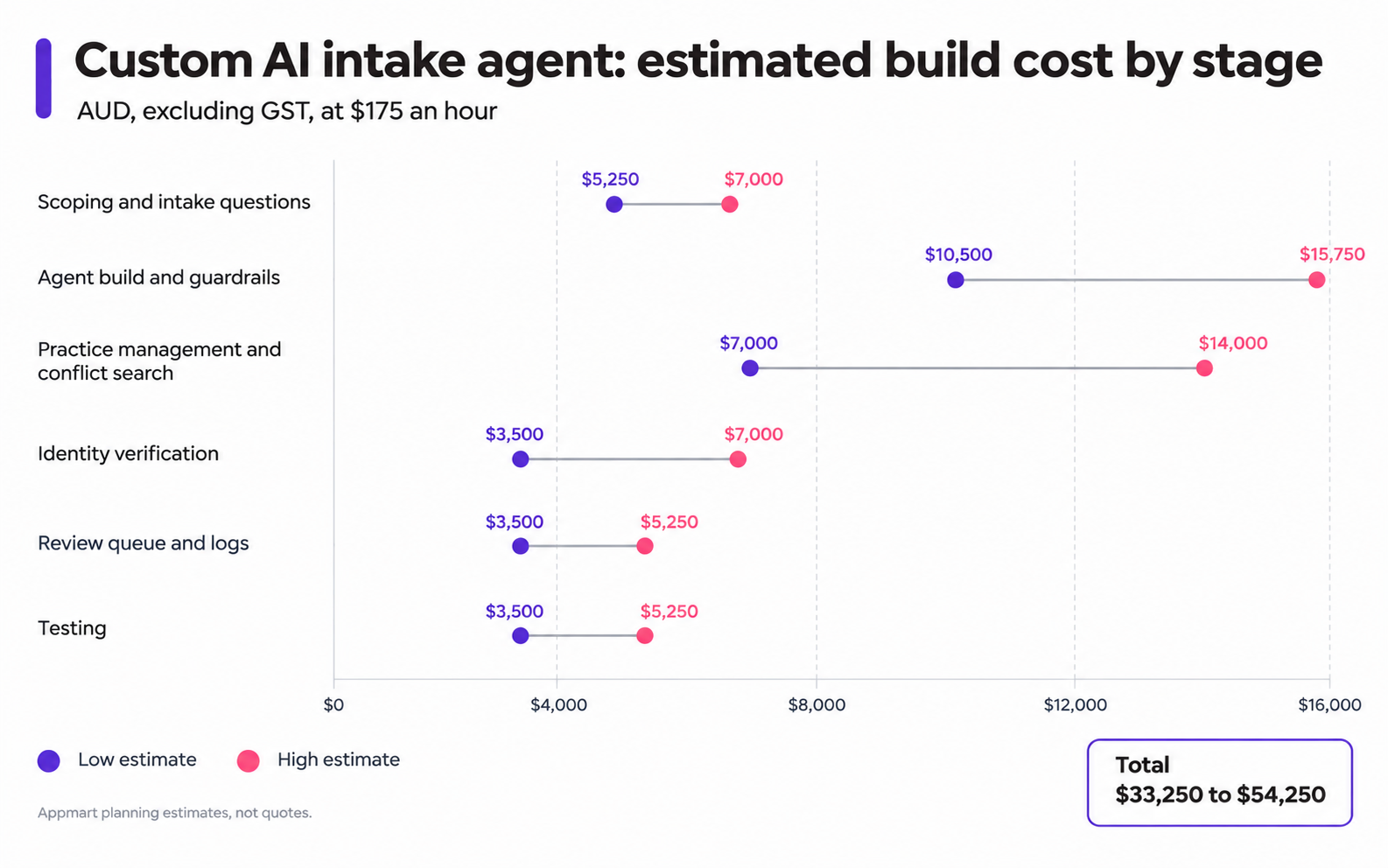
These are planning estimates, not quotes. Integration effort depends most on your practice management system's API. Budget 15% to 20% of the build each year for maintenance, because AI models and vendor APIs change.
Your Firm's AI Policy Checklist
Write your AI policy before you switch on any tool, because regulators treat it as the base of responsible AI for law firms. The joint regulators' statement expects risk-based policies, and the Queensland Law Society publishes an AI policy template. Cover these eight points.
- Approved tools. List the AI tools staff may use and the tasks each one is approved for.
- Banned inputs. List what never goes into AI, starting with suppressed material, subpoenaed documents and documents produced under court orders.
- Review step. Name who checks AI output before it leaves the firm, and how they record it.
- Court rules. Check the practice note of each court or tribunal before every filing.
- Matter records. Log the tool, the purpose and the reviewer on each matter where AI was used.
- Fair billing. Bill AI-assisted work fairly, including time spent checking output.
- Client disclosure. Decide how you tell clients about AI use, and answer honestly when asked.
- Privacy policy. Update it for AML/CTF information and the 10 December 2026 automated decision rule, if they apply.
Get a Build-or-Buy Review for Your Firm's AI
Appmart builds custom software and AI tools for Australian businesses, with fixed-price proposals after a free scoping call. When Appmart reviews AI for law firms, Praharsh Parikh and the team start with what the firm already owns.
Appmart reviews your practice software, your intake process and the systems your client and matter data sits in. The team checks which court rules and privacy duties apply to your practice areas. Then Appmart tells you what to buy, what to configure and what is worth building.
If the AI in your practice software already covers your needs, Appmart will say so. If a custom intake agent wins, you get a fixed price before any work starts.
Frequently Asked Questions
The best starting point is the AI inside your practice software, such as Archie, LEAP AI or Clio Manage AI. Add a research AI built on Australian legal content for research. Large firms often use Harvey. A custom build suits intake and firm-specific workflows.
Not with confidential client information on a public plan. The NSW, Victorian and WA regulators say lawyers cannot safely enter confidential or privileged information into public AI chatbots. Business tools with confidentiality terms lower the risk, but lawyers must still verify every output.
It depends on the court. NSW requires statements in evidence documents and verification statements in AI-assisted submissions. The Federal Court requires disclosure in set cases, such as AI analysis a witness relies on. The FCFCOA generally requires disclosure only from experts, but you must explain your use if asked.
No. An intake agent should give general information only and pass every advice question to a lawyer. Advice generated by an automated system is unlikely to attract advice privilege. A lawyer should approve every fee estimate, decline and engagement document.
Firms with turnover under $3 million were largely exempt. Since 1 July 2026, firms providing AML/CTF designated services must apply the Australian Privacy Principles to information collected for AML/CTF purposes. Confidentiality and privilege duties apply to every firm regardless of size.
Appmart estimates $33,000 to $55,000 to build an intake agent with one practice management integration, excluding GST. Add monthly hosting and AI usage, and 15% to 20% of the build each year for maintenance. Voice intake adds call costs.