
Technical debt is the extra work an app collects when shortcuts, old parts or skipped updates go unfixed. You pay it back later through slower releases, more bugs and bigger maintenance bills.
I'm Vrushank Shah, Project Manager at Appmart. I've spent 12 years building and managing mobile apps across different industries. Many owners call me because their app has slowed down and they can't see why. Small changes take weeks. Fixes break other screens. Quotes for simple features keep growing. Technical debt is usually the cause, and it has often built up for years before anyone names it.
This guide explains what technical debt means, how it shows up in mobile apps and how to reduce it.
Technical debt meaning in plain English
Think of it as a business loan.
A developer takes a shortcut and borrows time. The app ships sooner. But the shortcut stays in the code, and every later change around it costs extra. That extra cost is the interest: more hours, more testing, more risk of breakage. Leave it unpaid and it slows down every feature you want.
Ward Cunningham coined the term. He later created the first wiki. In 1992 he used it to explain to his managers why a financial software product needed regular rework. It stuck because business owners already understand loans, interest and repayments.
Some debt is a reasonable choice. Say you launch a first version to test the market. A simpler backend makes sense then. You pay it down once the app has proven demand, like a mortgage. The trouble starts when nobody plans the debt or writes it down. In my experience, the debt nobody recorded costs the most to fix.
Types of technical debt
You can sort technical debt two ways: why it happened and where it sits in your app.
Deliberate vs accidental debt
Martin Fowler sorted debt on two axes in his technical debt quadrant. One axis asks whether the team chose the debt. The other asks whether the decision was careful. His model helps owners and developers discuss what to fix instead of who caused it.
| Careful (prudent) | Careless (reckless) | |
|---|---|---|
| Deliberate | “We know this is a shortcut and we'll fix it next quarter.” | “There's no time for proper design, so just release it.” |
| Accidental (inadvertent) | “Now it's live, we can see a better way to build it.” | “Nobody on the team knew the right way to structure this.” |
Careful, deliberate debt is usually fine. Careless, accidental debt causes most of the costly surprises.
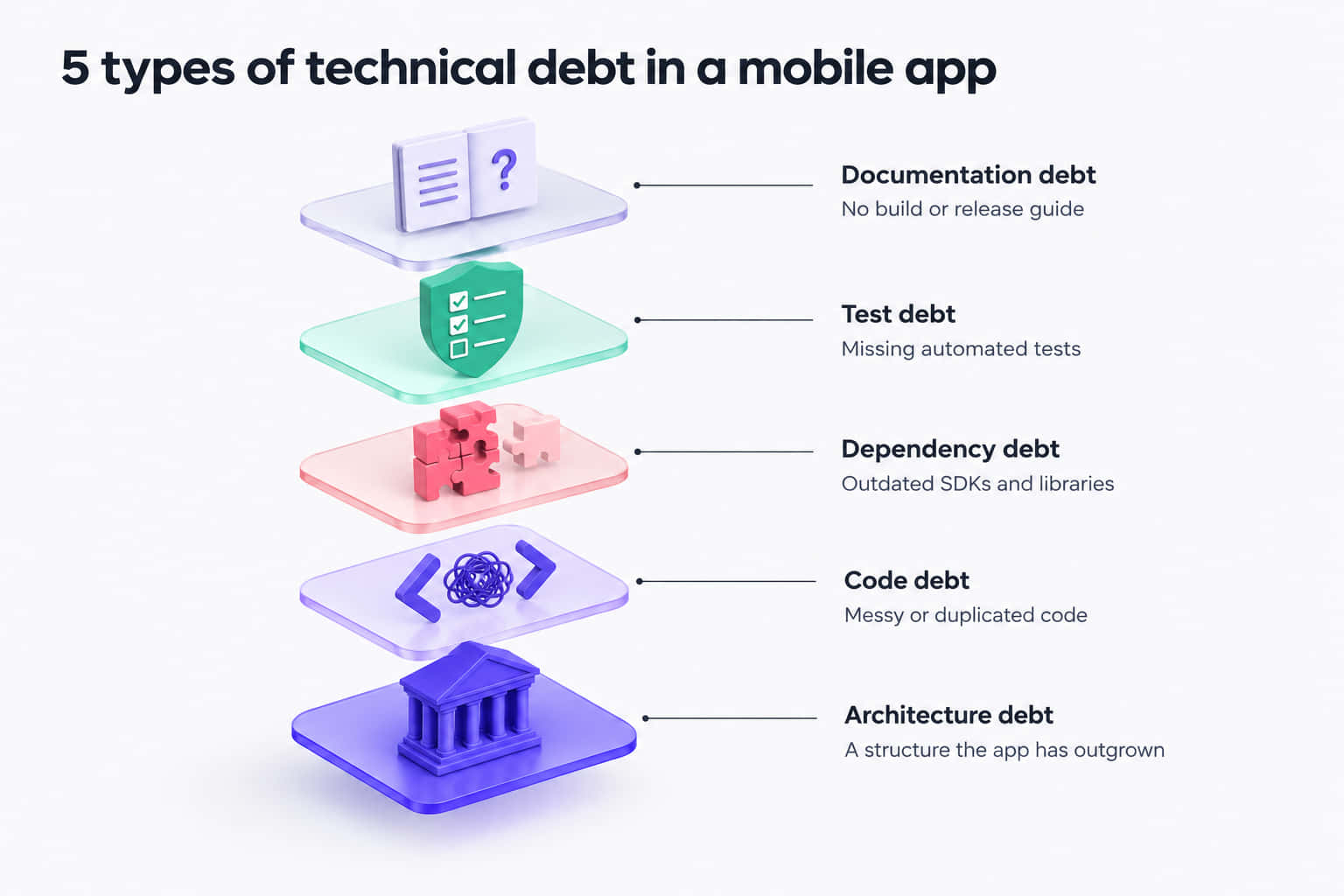
Code debt
This is code that works but is messy, duplicated or more complicated than it needs to be. Every developer who opens the file spends longer on even a small change.
Design and architecture debt
Here the structure no longer suits the app. A backend built for 500 users might now serve 50,000. This type is the hardest to fix and costs the most to repay.
Dependency debt
The app still relies on outdated SDKs, libraries, frameworks and third-party plugins. On mobile, this type is the most likely to block an App Store or Google Play release.
Test debt
Automated tests are missing or thin, so someone runs manual regression tests on every change. A fix in one part of the app can then break another, and nobody notices.
Documentation debt
There's no README, build guide or release runbook. You feel this most when you change developers or move to a new agency.
Technical debt examples in mobile apps
General software guides talk about legacy code. Mobile apps collect debt of their own, and the app stores set yearly deadlines that most web software never faces. These are the examples I see most often when my team reviews an existing app.
- An old iOS build setup. Since 28 April 2026, Apple only accepts uploads built with Xcode 26 and the iOS 26 SDK. An app nobody has rebuilt in two years often needs upgrades before it can ship a one-line fix.
- A low Android target API level. From 31 August 2026, Google Play requires new apps and updates to target Android 16 (API level 36). Existing apps that still target Android 14 or lower stop appearing for new users on newer phones.
- Deprecated APIs. Apple, Google, payment gateways and map providers retire older APIs on a published schedule. Code that depends on them works fine until support ends. Then the build breaks.
- Unmaintained packages and old framework versions. Many Flutter and React Native apps rely on open source packages maintained by one or two contributors. When those packages stop getting updates, every framework upgrade gets slower.
- No automated tests. A tester runs a manual regression pass before every release. Releases slow down, and bugs still reach your users.
- Hard-coded config values. API keys, prices, URLs or feature flags sit directly in the code. Changing one value means a new build and another round of store review.
- Legacy OS support. A low minimum OS version forces developers to write extra workarounds. But dropping versions without checking your user data can cut off paying customers.
- Missing documentation after an agency handover. The previous developer knew where everything lived, and none of it was written down. The new team spends its first few weeks working it out on your budget.
What causes technical debt?
Technical debt is rarely one person's fault. In 12 years, I've found it usually comes from ordinary decisions made under time or budget pressure.
- Rushed launches. A trade show, funding round or busy season sets the date, and the plan bends to meet it.
- Scope creep. Teams add features to a structure designed for something else.
- Key-person risk. When a developer leaves, their knowledge leaves too.
- No maintenance budget. Someone funds the build, but nobody funds the upkeep after launch.
- Skipped OS updates. Apple and Google release major versions every year, and each missed one makes the next harder.
The numbers back this up. In Stripe's 2018 Developer Coefficient survey, developers reported about 13.5 hours a week on technical debt. They spent close to four more hours on bad code, out of a 41-hour working week. In Australia, 66% of respondents said their developers often spend more time on debt than on strategic projects.
Signs your app has too much technical debt
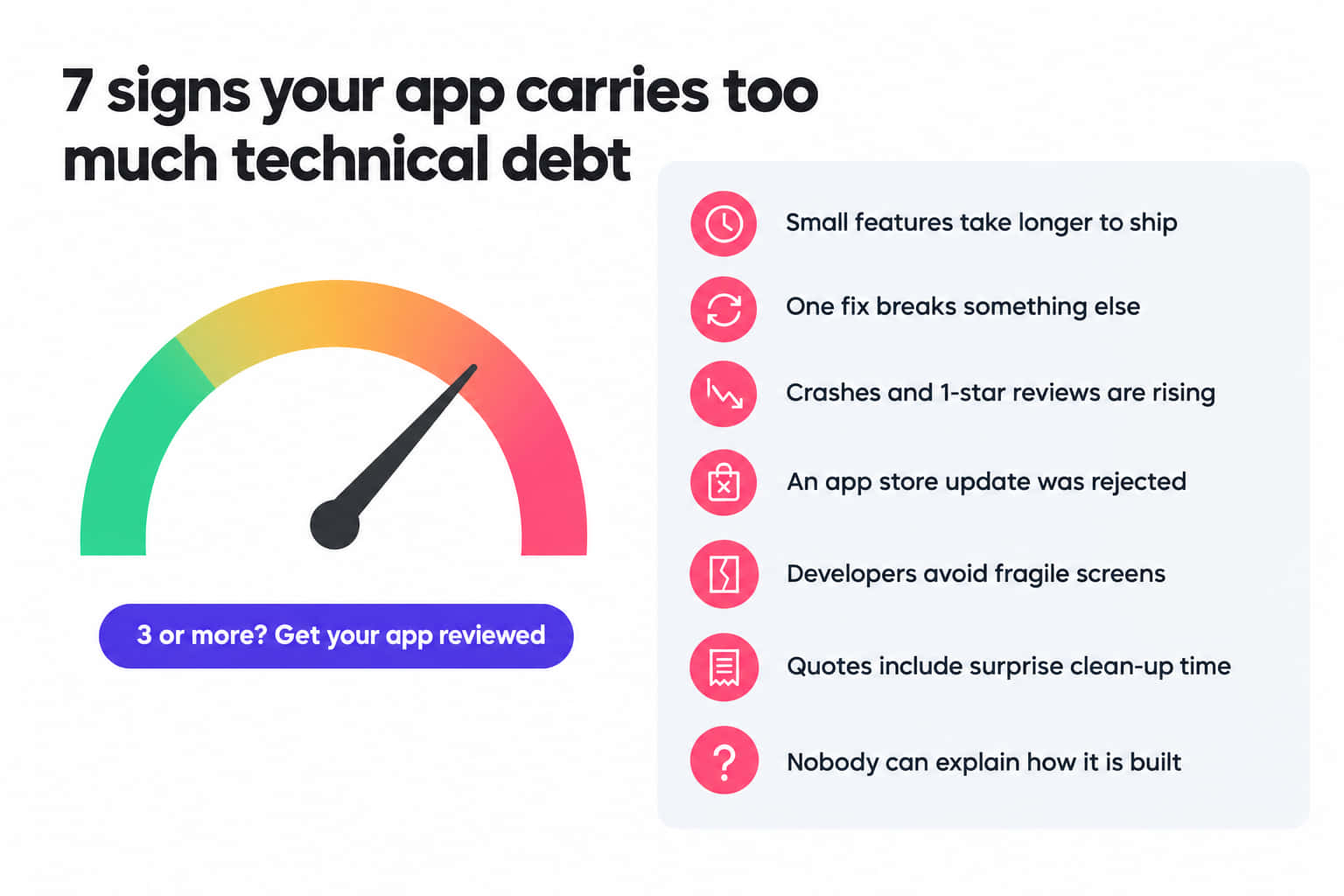
You don't need to read code to spot technical debt. Check your app against this list. If three or more apply, ask a senior developer or tech lead to review it.
- Small features take much longer to ship than they used to.
- Fixing one bug often creates another.
- Your crash rate or number of one-star reviews is rising.
- Apple or Google has rejected or blocked an update.
- Developers call certain screens fragile and avoid them.
- Quotes include “clean-up” or “upgrade” time you didn't expect.
- Nobody can explain how the app is built and released.
If several apply, an app health check will show where the debt sits and what to fix first.
How to measure technical debt
I check these numbers before I give any advice on an existing app.
| Metric | What it tells you | What to watch for |
|---|---|---|
| Technical debt ratio | Estimated cost to fix known issues, compared with the cost of writing the code | A ratio that keeps rising (SonarQube gives an A rating at 5% or below) |
| Crash-free sessions | Share of user sessions that end without a crash | A drop after a new release |
| Dependency age | How far your SDKs and libraries trail current versions | Major versions behind, or packages with no update in a year |
| Code churn | How often the same files get rewritten | The same files changing in every release |
| Test coverage | How much of the code automated tests check | Login, payments or bookings with no tests |
| Lead time for a small change | Days from request to live in the stores | Simple changes taking weeks |
SonarQube calculates the debt ratio from your codebase. Firebase Crashlytics tracks crash-free sessions on iOS and Android. The metric I rely on most is lead time for a small change. Any owner can track it with no special tools.
How to reduce technical debt
The cheapest debt is the debt you avoid at the start. Here is how that worked on one of our projects.
An Australian care management startup came to us with a detailed brief. Its founders had coordinated care for family members with complex needs, and they wanted one app for it. The app had to handle medication schedules, appointments, therapy tasks, notes and provider details in one place. It also needed invited carers, role-based permissions, secure handling of health data and Free and Premium subscriptions.
That many features in a few oversized view controllers builds debt fast. So my team planned the structure before writing features. We built the native iOS app in Swift and SwiftUI, using MVVM-C and Clean Architecture. Each feature sits in its own layer, so changing reminders doesn't touch subscriptions or permissions. We used CoreData for offline storage and secure REST APIs for syncing. That keeps the data layer separate.
My team delivered the app on time. It has cut administrative workload by over 40%, and over 95% of care tasks now get completed on time. The codebase also lets us add features without reworking old ones.
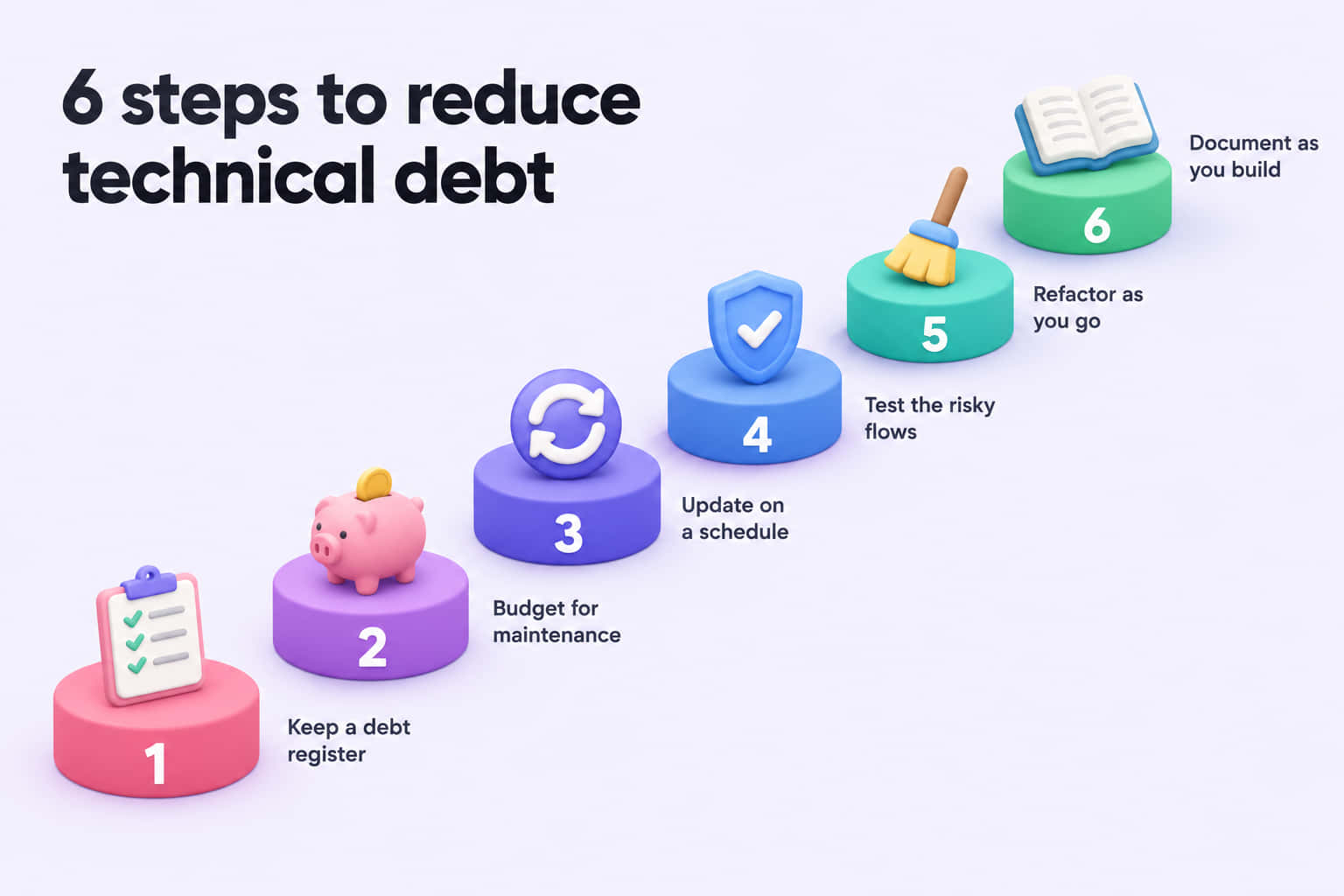
Most owners come to us with debt already in place, though. For those apps, I recommend six steps.
- Keep a tech debt register. Log every known item in the backlog and rank it by risk to revenue and security. Fix anything that blocks store releases first, and leave cosmetic clean-ups for later.
- Budget for maintenance. Treat upkeep as a running cost, like insurance. A fixed percentage of every sprint stops debt work from always losing to new features.
- Update dependencies on a schedule. Review SDKs, libraries and frameworks at least every quarter. Plan around Apple's and Google's yearly deadlines. Small, regular upgrades cost far less than one big catch-up project.
- Add tests around the risky areas. You don't need full coverage to see a benefit. Start with the flows that earn or lose money, such as sign-up, login, checkout and bookings.
- Refactor as you go. Each time a developer works on a feature, they tidy that part of the code. Leave each file cleaner than you found it.
- Document as you build. Keep a short, current record of how the app is set up, built and released. Onboarding a new developer then takes days instead of weeks.
If you'd rather hand this over, our app support team follows the same six steps in our app support and maintenance service.
Technical debt vs regular maintenance
Maintenance is the repayment plan. Technical debt is the balance. Regular maintenance covers OS updates, security patches and bug fixes. Debt grows when that work gets skipped or rushed.
A good app maintenance plan keeps the balance low enough that it rarely delays new features.
When debt means it's time to modernise
Sometimes the debt is so widespread that patching costs more than it saves. If the app's architecture can't support where your business is heading, modernising may be the better option. I explain how to make that call in our guide to legacy app modernisation.
Frequently asked questions
No. Planned debt can be a reasonable trade-off, especially for a first version built to test demand. It becomes a problem when nobody records it or sets a budget to repay it. Debt that builds up by accident is the other warning sign. Aim for debt you chose, logged and can afford to repay.
The people who build the app and the people who fund it share responsibility. Developers should flag shortcuts and explain the risks in plain language. Owners decide how much time and budget goes to repayment. Whoever manages the project should keep a written list, so those decisions rest on full information.
There's no fixed figure. Cost depends on the app's size, age and how long the debt has sat there. It shows up as slower releases, higher quotes and lost users. Stripe's 2018 Developer Coefficient research found developers spend about a third of their week on technical debt.
Not realistically. Apple and Google change their platforms every year, so even a well-built app collects debt over time. But you can keep it small. Update on a schedule, test the critical flows, document the setup and review the app's health every year.
Find out what slows your app down
Technical debt is easier and cheaper to fix when you know where it sits. Our free app health check gives you a risk-ranked backlog of your app's debt before you commit to any work.
Book a free app health checkWant ongoing help instead? See our mobile app maintenance service.